 Beam
Beam Find and open
Weather
Type weather for live conditions and the next few days, right in the launcher. No account, no API key.
Asking for weather
Beam recognises weather-flavoured typing, not a fixed keyword list. Prefix typing works (weat, forec, rain t), and the weather row outranks apps.
| Type | Result |
|---|---|
weather | Current conditions and forecast for your place. |
weather in sydney, forecast adelaide, temperature in tokyo | The forecast for that city, not your default place. |
sydney weather, adelaide forecast | City-first phrasing works too. |
rain tomorrow, is it raining, umbrella, jumper | Weather-flavoured phrases all land on the forecast. |
17° | A bare temperature asks for the weather. |
The hero card
Weather gets its own card in the launcher, not the calculator layout: a big live temperature with a condition symbol on the left, the place with feels-like and wind underneath, and a day strip on the right showing each day's high, low and rain chance (a droplet appears from 20% up).
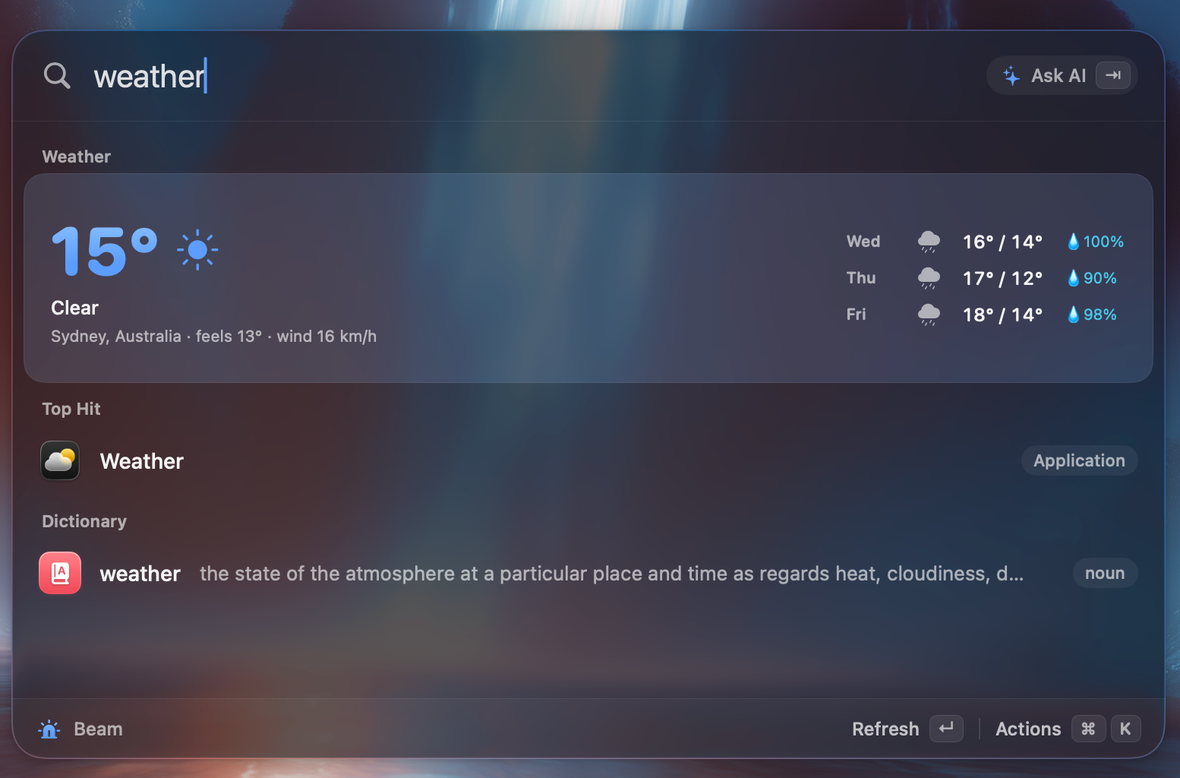
Actions on the row: Refresh (bypasses the cache) and Open in Browser (wttr.in). Asking for a specific city adds a third action, Set as my weather place, which pins that city in Settings.
Where the place comes from
Beam picks your weather location in this order:
- Your place override from Settings → General → Weather, if you set one.
- Your device location. Beam asks for When-In-Use location permission once, at launch, at kilometre accuracy. It keeps the latest fix and a reverse-geocoded locality on your Mac, follows you as you move, and refreshes the forecast when your locality changes. It never prompts mid-query.
- Your time zone's city (for example Adelaide from Australia/Adelaide) when location is denied or unavailable. This fallback is silent.
Data, caching and errors
Forecasts come from Open-Meteo (the forecast and geocoding APIs). No key, no account. Results are cached for 30 minutes, network requests time out after 6 seconds, and the forecast is prefetched at launch and when the launcher opens so the card is instant. If the lookup fails, the row says Weather unavailable with the reason instead of vanishing.
Weather in the AI and your calendar
The assistant has a read-only weather_forecast tool: current conditions plus a 3-day forecast with rain chances, so you can ask the chat anything weather-related.
When a calendar event starts within 6 hours, its row shows a rain note if rain is likely that day.
Settings
Settings → General → Weather: a toggle (on by default) and a Place field. Leave the place empty for automatic location.
What leaves your Mac
A place name or your approximate coordinates go to Open-Meteo to look up the forecast. The location fix itself stays on your Mac. See Privacy and permissions.